Last updated: October 2026
Quick Answer
The best FC 27 settings for competitive gameplay focus on consistent shooting, responsive defending, reliable player switching and a camera that gives you a clear view of the pitch.
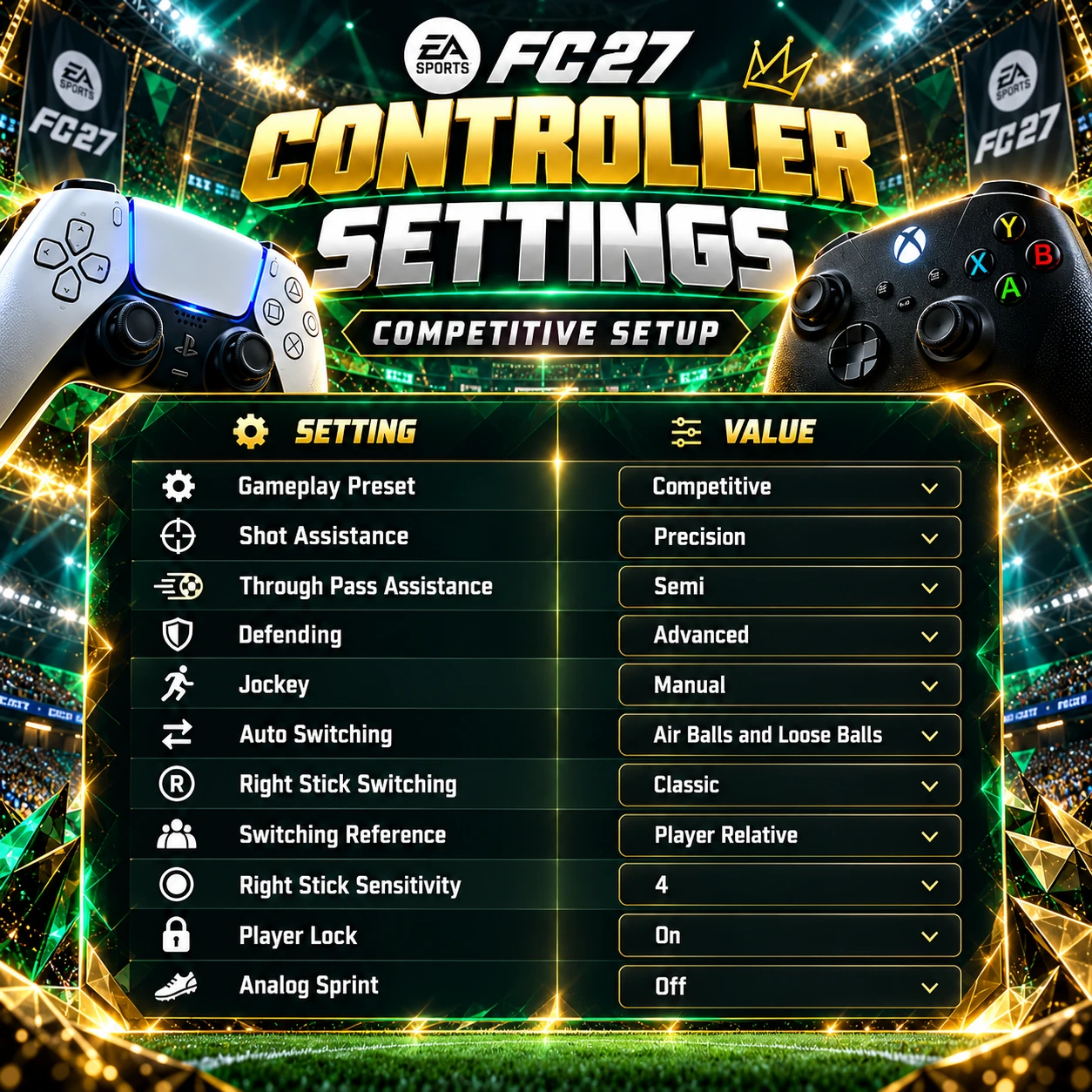
If you play Division Rivals, FUT Champions or other competitive Ultimate Team modes, we recommend starting with the Competitive gameplay preset and adjusting a few important settings.
Our preferred setup includes Precision Shooting, Advanced Defending, Classic right-stick switching, Player Relative reference and Analog Sprint turned off.
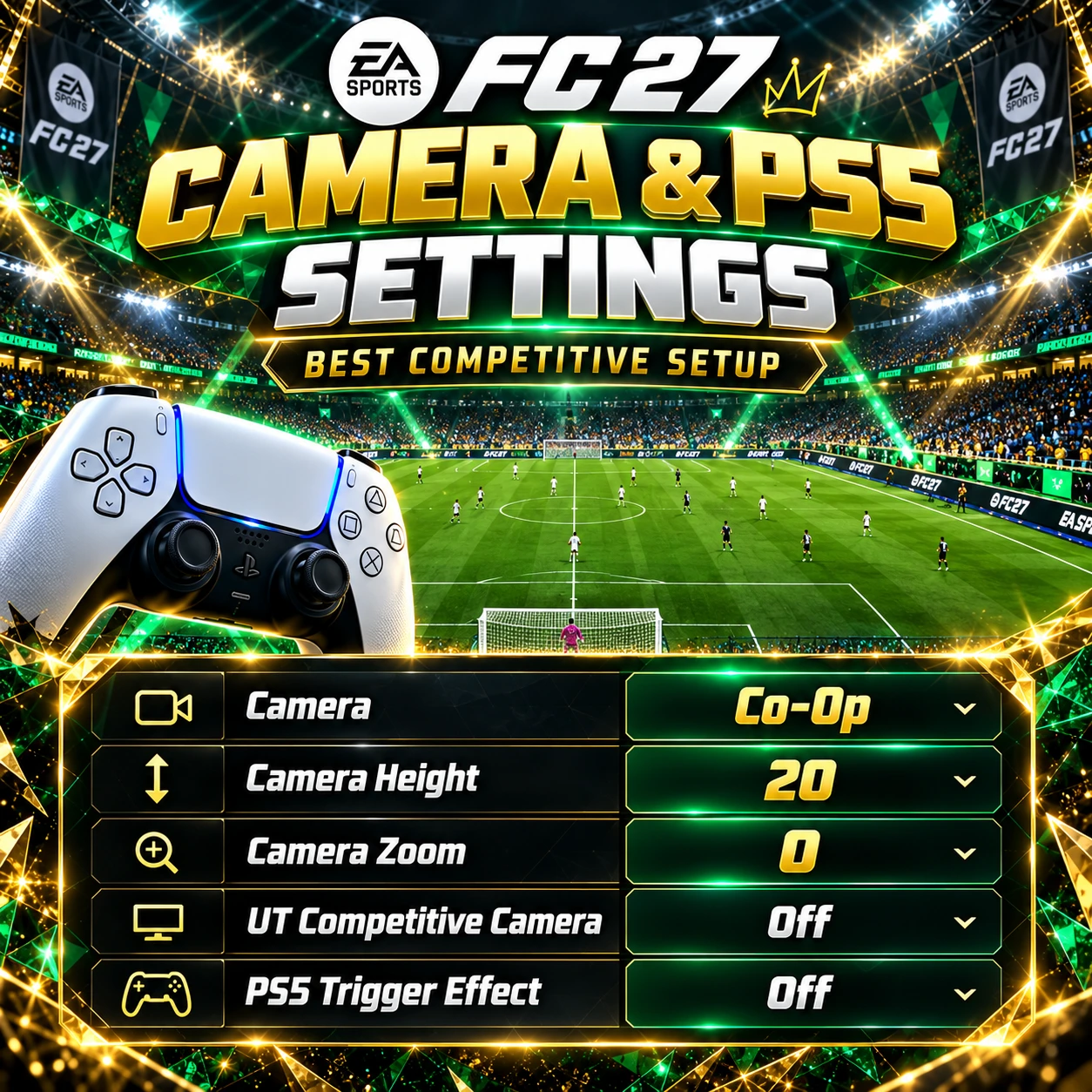
For the camera, we recommend Co-Op with Height 20 and Zoom 0.
PS5 players may also benefit from disabling the DualSense Trigger Effect for a lighter and more consistent trigger feel.
Here is a quick overview of our recommended FC 27 settings.
For players who prefer more assistance, Assisted Shooting and Tactical Defending are good alternatives.
These settings are starting recommendations rather than universal rules. The best setup is the one that lets you perform consistently without making the game unnecessarily difficult.
Why Your FC 27 Settings Matter More Than You Think
Many Ultimate Team players spend hours searching for the best formations, custom tactics and meta players.
However, one of the most overlooked aspects of gameplay is the controller configuration.
Sometimes your tactics are not the problem.
Your settings might be making certain actions less predictable than they need to be.
For example, incorrect player switching can leave a defender out of position. An unsuitable shooting configuration can make simple chances harder to finish. A camera with a limited field of view can prevent you from recognising dangerous attacking runs.
These problems become particularly frustrating during competitive matches, where small mistakes can decide the result.
The right settings can help you:
• Maintain more consistent control over shooting and passing.
• Switch defenders more reliably.
• Improve manual defensive positioning.
• Recognise attacking runs earlier.
• Reduce unwanted automated actions.
• See more of the pitch during counterattacks.
Of course, changing your settings will not automatically make you a better player.
Positioning, decision-making and practice remain essential.
But a well-configured controller can make it easier to apply those skills consistently.
If you are also looking for an effective formation, check out our FC 27 Custom Tactics Guide, where we break down popular setups used by competitive players.
Best FC 27 Controller Settings for Competitive Gameplay
Our recommended controller setup is designed to balance manual control with useful assistance.
You do not need to disable every assisted feature to become a competitive player.
Instead, we recommend retaining assistance where it improves consistency while taking more control over important attacking and defensive decisions.
Best FC 27 Shooting Settings
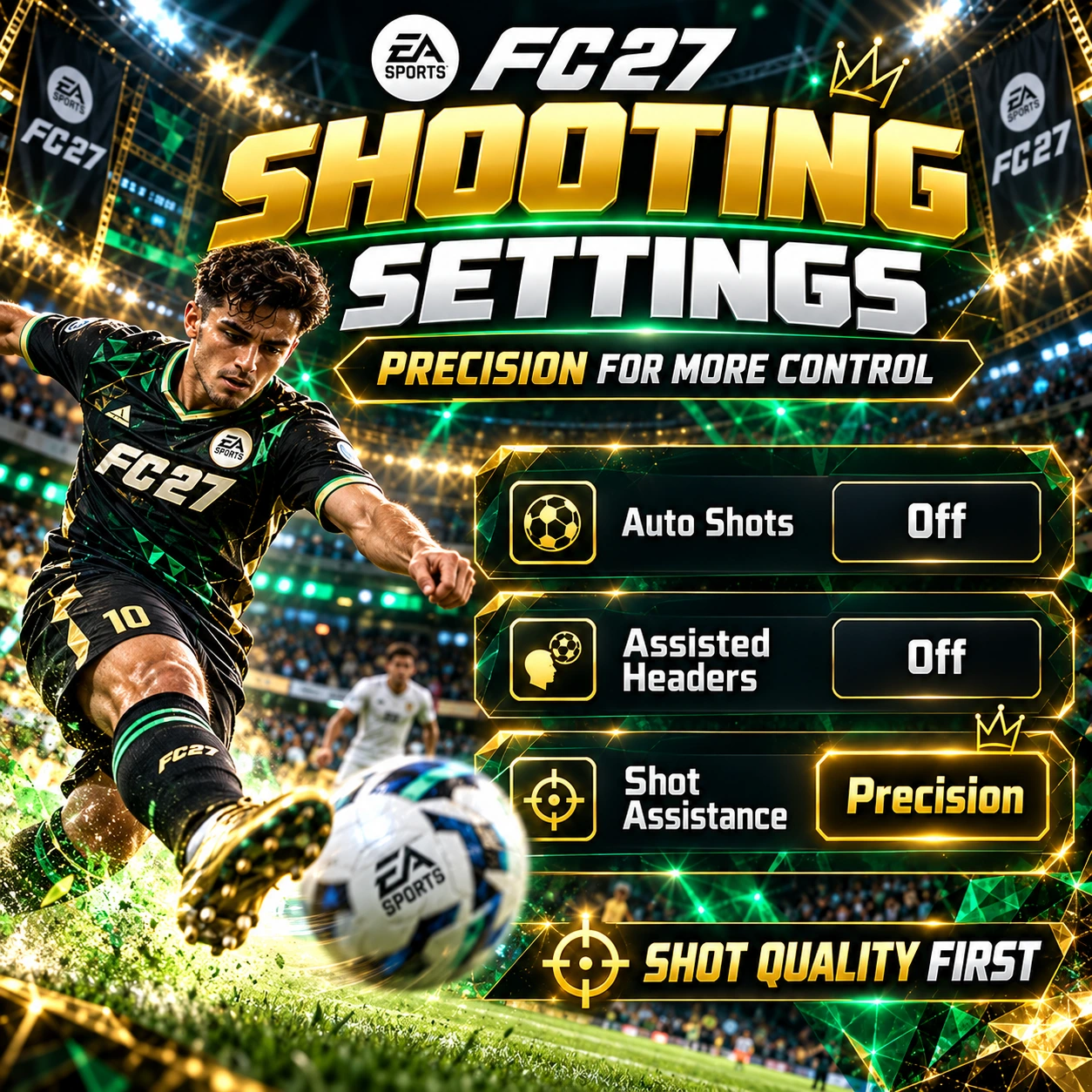
Precision Shooting vs Assisted Shooting
Precision Shooting is our preferred option for players who want greater influence over shot placement.
With Precision, the direction of your input becomes more important, although the game still provides some assistance.
This can be useful when attempting finishes toward specific areas of the goal.
However, Precision Shooting also requires practice.
Poor aiming can result in missed chances that might have been easier with Assisted Shooting.
Assisted Shooting provides more automatic help with aiming and is therefore a more forgiving option.
For players who are still learning the shooting mechanics, Assisted may produce more consistent results.
Our Recommendation: Use Precision if you already feel confident with your aiming. Otherwise, begin with Assisted and switch once you become more comfortable.
Best FC 27 Passing Settings
Passing is one of the most important gameplay mechanics in FC 27.
Whether you prefer quick counterattacks or patient possession, reliable passing helps maintain control and create scoring opportunities.
Here are our recommended settings.
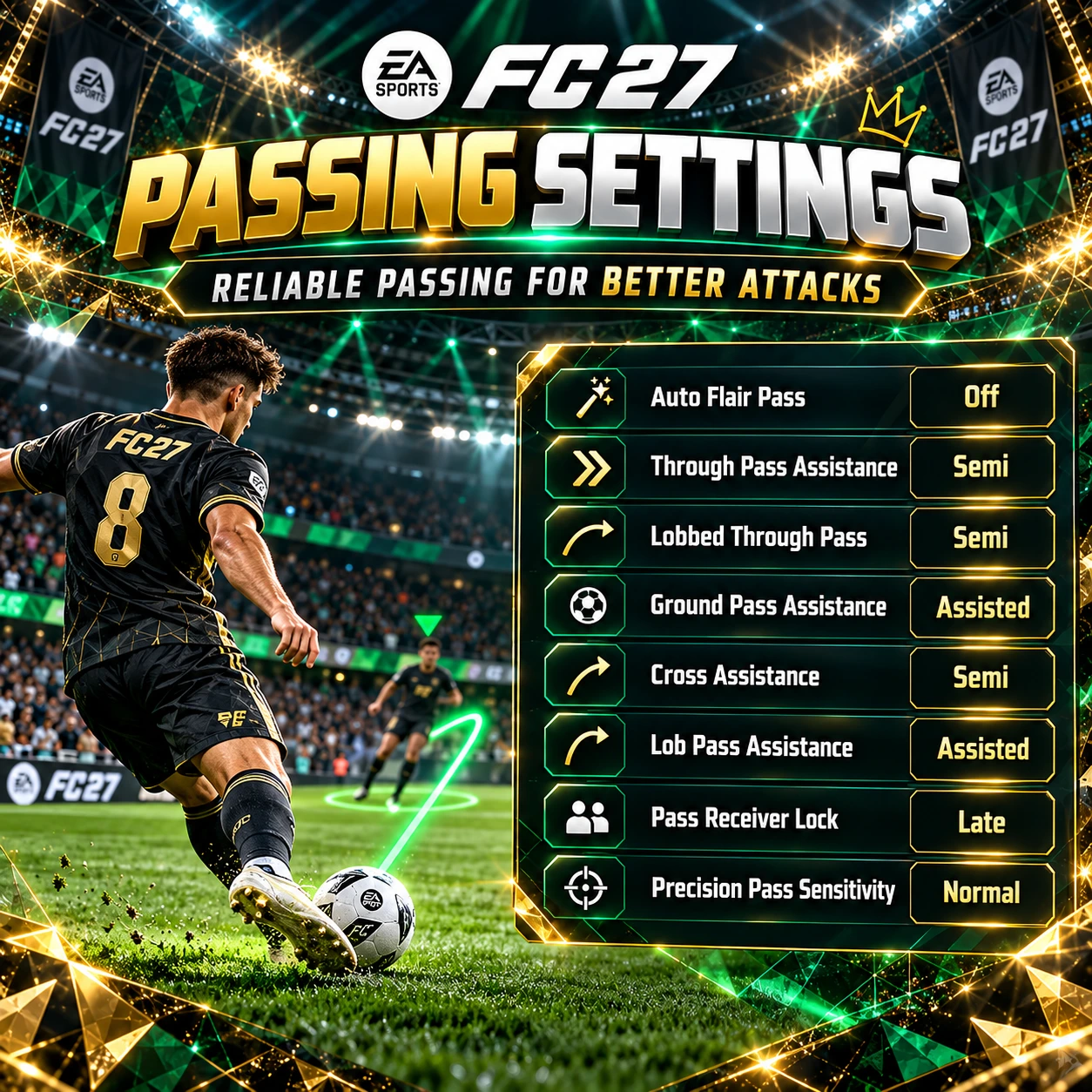
Why Use Semi-Assisted Through Balls?
Through balls are particularly important when attacking the space behind an opponent's defensive line.
They are useful for quick counterattacks, finding forward runs and creating one-on-one situations.
Semi assistance gives you greater influence over the direction of the pass.
This is attractive for players who want to target particular spaces rather than relying entirely on automatic assistance.
However, inaccurate inputs can also lead to turnovers.
That is why we recommend keeping regular Ground Pass Assistance on Assisted.
This combination provides reliable short passing while allowing more directional control over through balls.
What About Pass Receiver Lock?
Our preferred setting is Late.
It delays the final selection of the intended receiver compared with earlier locking options.
This can be useful when passing opportunities change quickly.
However, if you prefer earlier commitment to a receiver, experimenting with other available settings is reasonable.
Should You Use Semi-Assisted Crosses?
We recommend trying Semi if you want additional control over crossing direction.
However, players who regularly struggle with crosses may prefer Assisted.
There is no reason to use a more demanding setting if it consistently reduces your attacking efficiency.
Best FC 27 Defending Settings
Defending is another area where controller settings can significantly influence your experience.
FC 27 rewards correct positioning, player switching and well-timed challenges.
The goal is to maintain control over your defensive actions without constantly relying on automatic interventions.
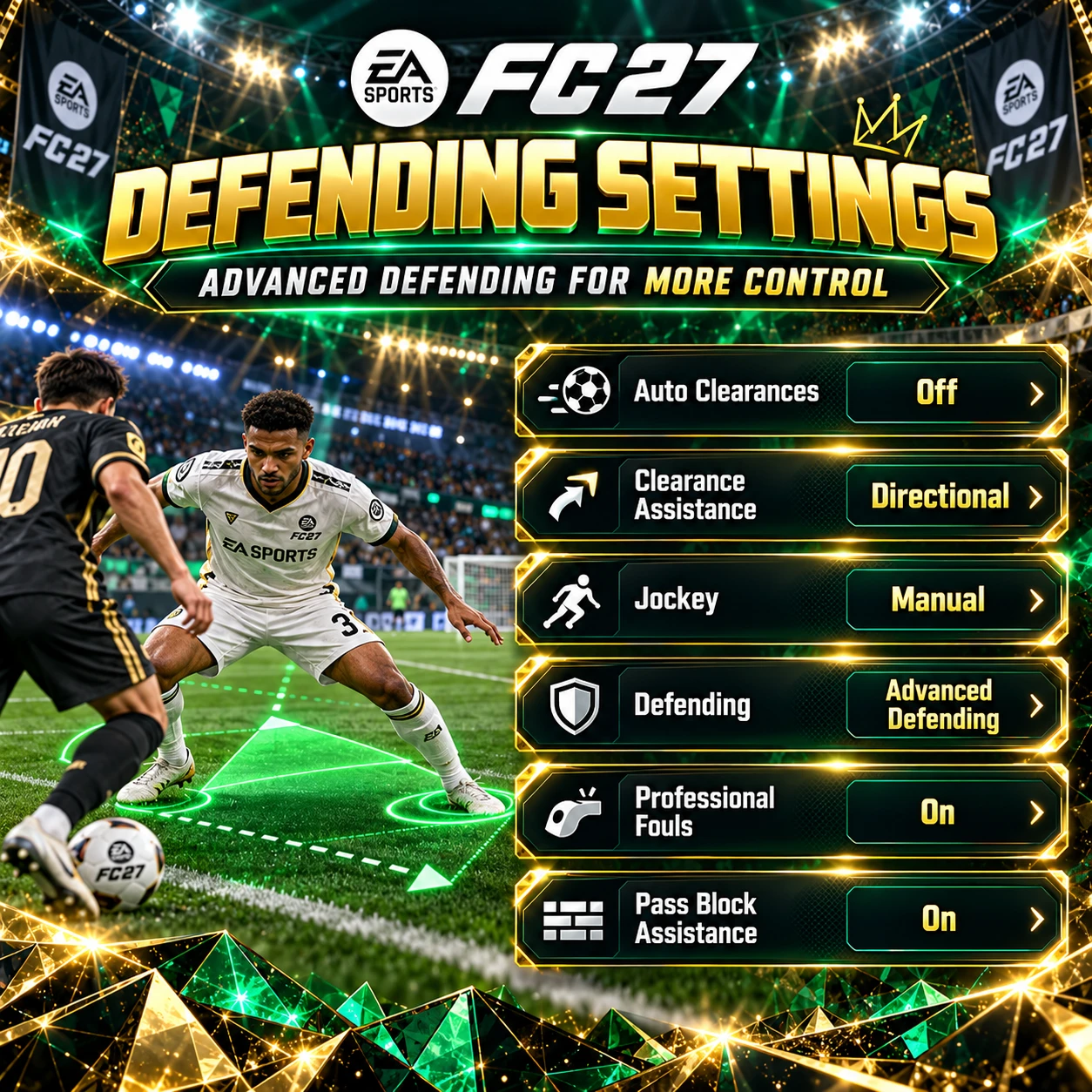
Advanced Defending vs Tactical Defending
This is one of the most important decisions when configuring your controller.
Advanced Defending provides additional control over defensive challenges.
It allows players to choose different defensive actions using the corresponding controls.
This gives experienced players more flexibility when deciding how to challenge an opponent.
However, it also requires better timing and familiarity with the controls.
Tactical Defending provides a simpler approach, with more contextual selection of certain defensive actions.
For players who want to develop advanced manual defending skills, we prefer Advanced Defending.
For beginners, Tactical Defending can be easier to use consistently.
Neither option guarantees successful defending.
Why We Recommend Manual Jockey
Manual Jockey gives you direct responsibility for positioning your defender.
This is useful when trying to stay in front of an attacker, protect passing lanes and avoid unnecessary tackles.
However, it requires practice.
Moving too aggressively can create gaps that your opponent exploits.
Try to maintain a controlled defensive position rather than constantly chasing the player carrying the ball.
Our Recommendation: Manual Jockey is worth learning if you want to improve your defensive control.
Should Pass Block Assistance Be On?
Yes.
We recommend keeping Pass Block Assistance enabled.
It can support interception attempts when defenders are positioned appropriately.
However, good positioning remains essential.
A player standing several metres away from the passing lane will not automatically intercept the ball simply because the setting is enabled.
Best FC 27 Player Switching Settings
Player switching is one of the most important skills in competitive Ultimate Team.
Even an excellent defender can become ineffective if you select the wrong player at the wrong moment.
The ability to switch quickly and accurately helps you protect dangerous areas before your opponent creates a chance.
Here is our recommended configuration.
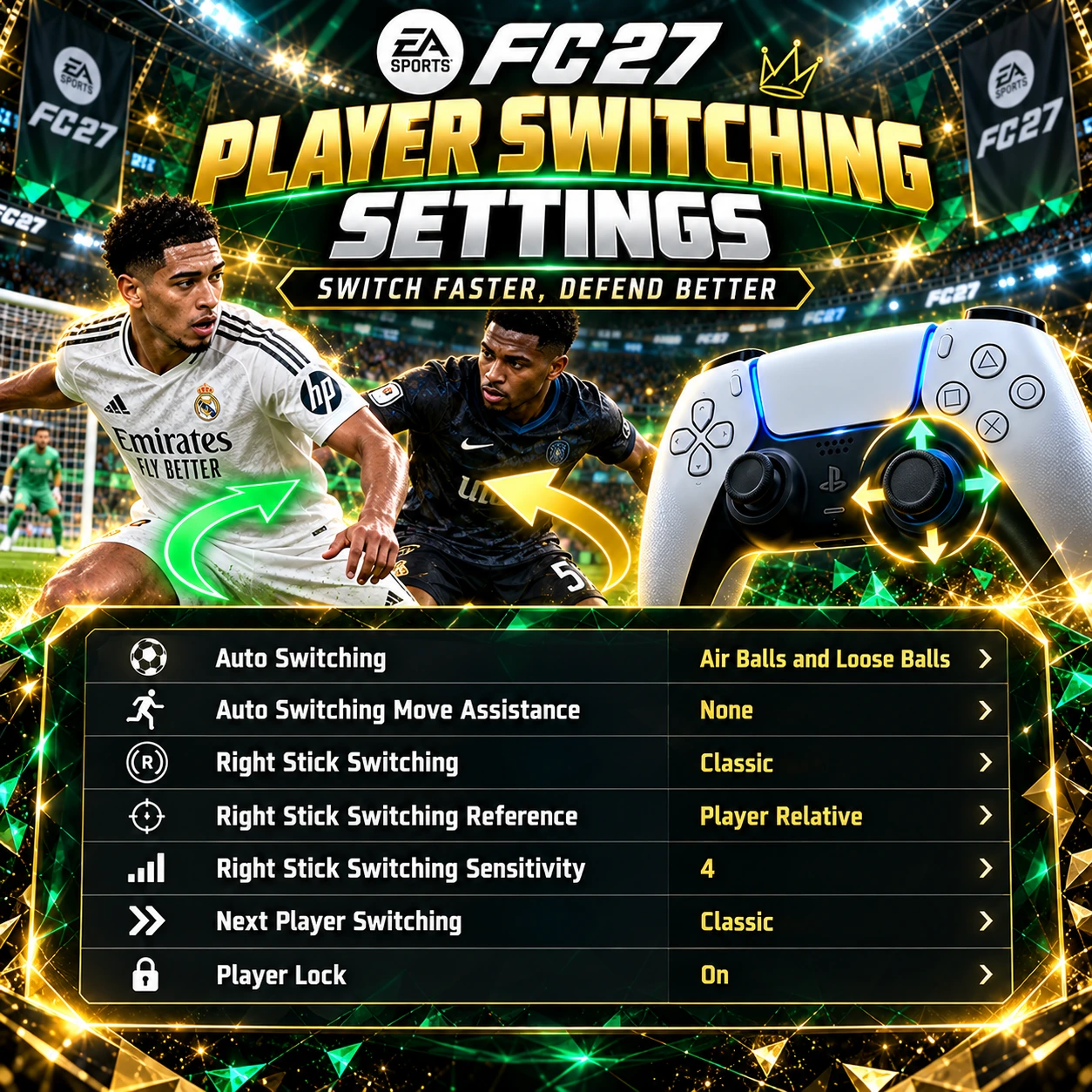
Why Air Balls and Loose Balls?
This option limits automatic player switching mainly to aerial situations and loose balls.
During regular defensive sequences, you retain greater responsibility for choosing the player you control.
This can reduce unwanted switches that disrupt your defensive positioning.
For example, if you are manually covering a passing lane, an unexpected automatic switch can create an opportunity for your opponent.
Using Air Balls and Loose Balls provides a reasonable balance between assistance and control.
Why Classic Right Stick Switching?
Classic right-stick switching allows you to select players by flicking the right stick toward the teammate you want to control.
This can be particularly useful when defending against through balls and counterattacks.
Instead of repeatedly pressing the player-switch button, you can target the defender who is best positioned to stop the attack.
The mechanic takes practice, but it is an important part of developing more reliable defensive control.
Player Relative vs Ball Relative
We recommend Player Relative as a starting point.
With this configuration, switching directions are calculated relative to the player you are currently controlling.
This can feel predictable once you become familiar with the system.
Ball Relative is another legitimate option.
Some players prefer switching based on the position of the ball.
Neither setting is universally superior.
The important thing is to choose one reference system and develop consistent habits.
Best Right Stick Sensitivity
Our recommended starting value is 4.
It provides a relatively controlled switching response.
If you regularly select the wrong defender, experiment with slightly different values.
Avoid changing multiple switching settings at once.
Otherwise, it becomes difficult to understand which adjustment actually improves your control.
Player Lock – Should You Turn It On?
We recommend keeping Player Lock enabled.
Player Lock allows you to take direct control of an off-ball footballer in certain attacking situations.
This can help you create movement that the opponent does not expect.
For example, you can manually control a runner while another player remains in possession.
This creates additional attacking possibilities, especially when facing organised defensive systems.
However, Player Lock is not essential for every attack.
It is an advanced mechanic that becomes more useful as you practise it.
Our Recommendation: Keep Player Lock On, but learn the mechanic gradually rather than trying to use it during every attacking sequence.
Analog Sprint – Why We Recommend Off
Another important setting is Analog Sprint.
Our preferred configuration is:
• Analog Sprint: Off
When Analog Sprint is enabled, the distance you press the sprint trigger can influence the sprint input.
Turning it off removes that additional variable.
For players who prefer a more consistent trigger response, this can make sprinting feel easier to reproduce.
However, some players enjoy the progressive control offered by Analog Sprint.
If you prefer that behaviour, keeping it enabled is reasonable.
For competitive gameplay, we recommend testing Off first.
Best FC 27 Camera Settings – Co-Op Height 20, Zoom 0
Camera settings are extremely important because they determine how much information you can see during a match.
A camera that focuses too closely on individual players can make it difficult to recognise passing options or track opponents moving behind your defence.
Our preferred configuration is:
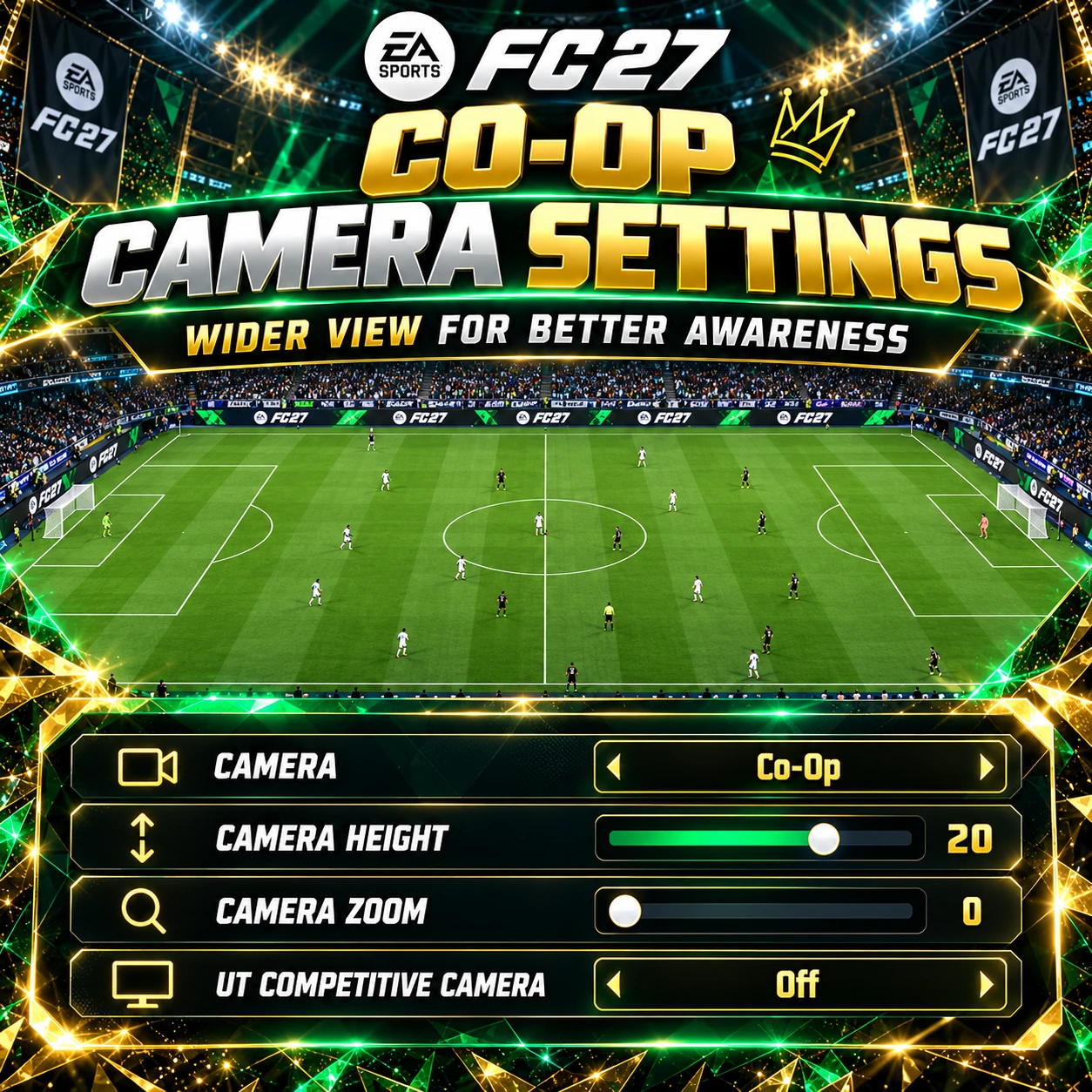
Why Is Co-Op One of the Best Cameras?
Co-Op is our preferred option for competitive gameplay because it offers a wide view of the pitch.
This helps you recognise attacking runs, defensive gaps and available passing options.
A wider perspective can be particularly valuable when using formations that rely on quick counterattacks.
You can identify forward runs earlier and decide whether to play a through ball, retain possession or switch the attack.
Co-Op can also help defensively because you can see more of the surrounding players.
Why Height 20 and Zoom 0?
Height 20 raises the camera position.
Zoom 0 maintains a wide field of view.
Together, these values help maximise how much of the pitch is visible.
For players using a gaming monitor, this can be particularly effective.
However, if you play on a large television from a considerable distance, the footballers may appear too small.
In that case, slightly increasing Zoom can make gameplay easier to follow.
Our Recommendation: Start with Height 20 and Zoom 0, then adjust Zoom to your screen size and viewing distance.
Should UT Competitive Camera Be On or Off?
We recommend Off when using this particular Co-Op configuration.
The goal is to retain your chosen camera angle rather than use the dedicated Ultimate Team competitive camera.
However, some players prefer the latter.
Both options are worth comparing before deciding which one feels better.
Best FC 27 Graphics Settings – Make the Pitch Clearer and More Vibrant
Controller settings are only part of the experience.
The appearance of the pitch, players, stadium and ball can also affect how easily you read the game.
The visual reference accompanying this guide recommends adjusting brightness, contrast and High Contrast options to create a clearer and more vibrant presentation.
This can be useful, but there is one important distinction.
The most saturated image is not always the easiest image to play with.
Extreme graphics settings can make certain elements stand out while reducing detail elsewhere.
The best result depends on your monitor, television, HDR configuration and lighting conditions.
Best FC 27 Brightness and Contrast Settings
The reference graphic suggests the following configuration:
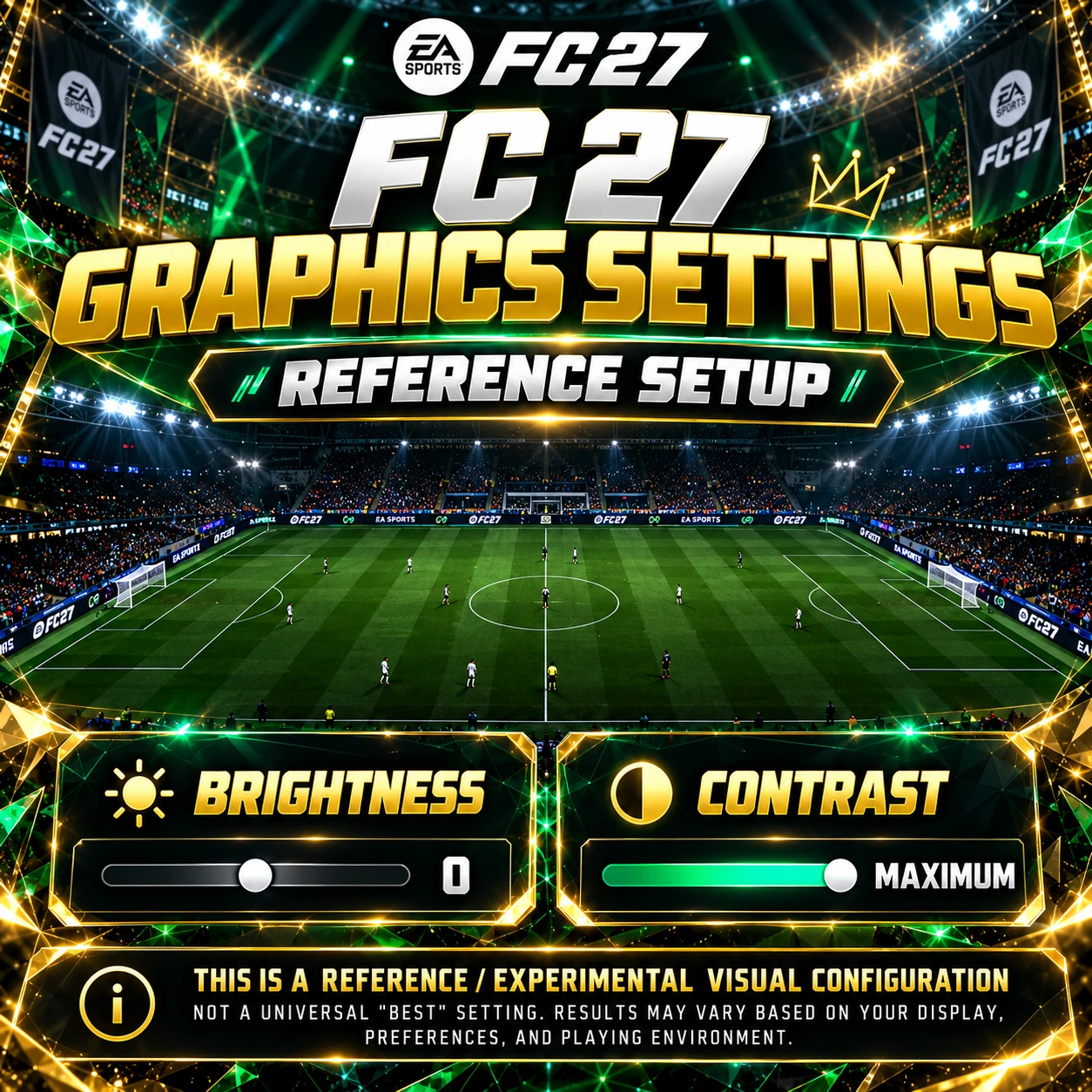
These are aggressive visual settings designed to produce a particular appearance.
However, we would not recommend copying them without testing.
Brightness 0 may make dark areas harder to distinguish.
Maximum Contrast can increase separation between bright and dark elements but may also reduce detail in shadows or highlights.
For most players, we recommend beginning with balanced values.
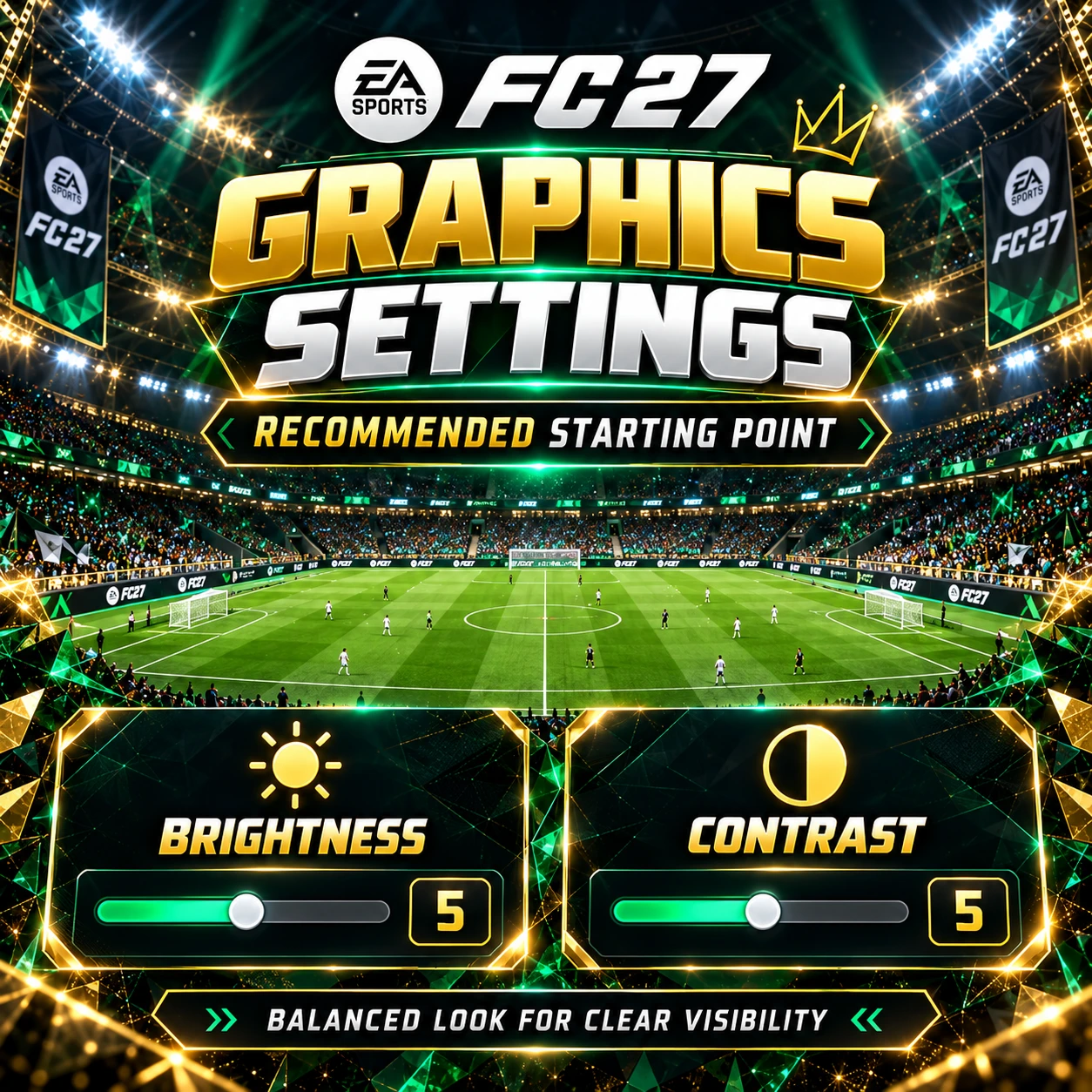
From there, gradually adjust the picture until the ball, players and pitch markings remain clearly visible.
How to Adjust Brightness and Contrast
Open the game's visual settings and find the Brightness and Contrast controls.
Start with the default values.
Then check whether you can comfortably distinguish players against the pitch.
Pay attention to white kits, dark shirts, stadium shadows and the ball.
Make small adjustments rather than immediately moving every slider to its maximum or minimum value.
Our Recommendation: Prioritise visibility and consistency instead of maximum brightness or saturation.
High Contrast Mode and Field Saturation
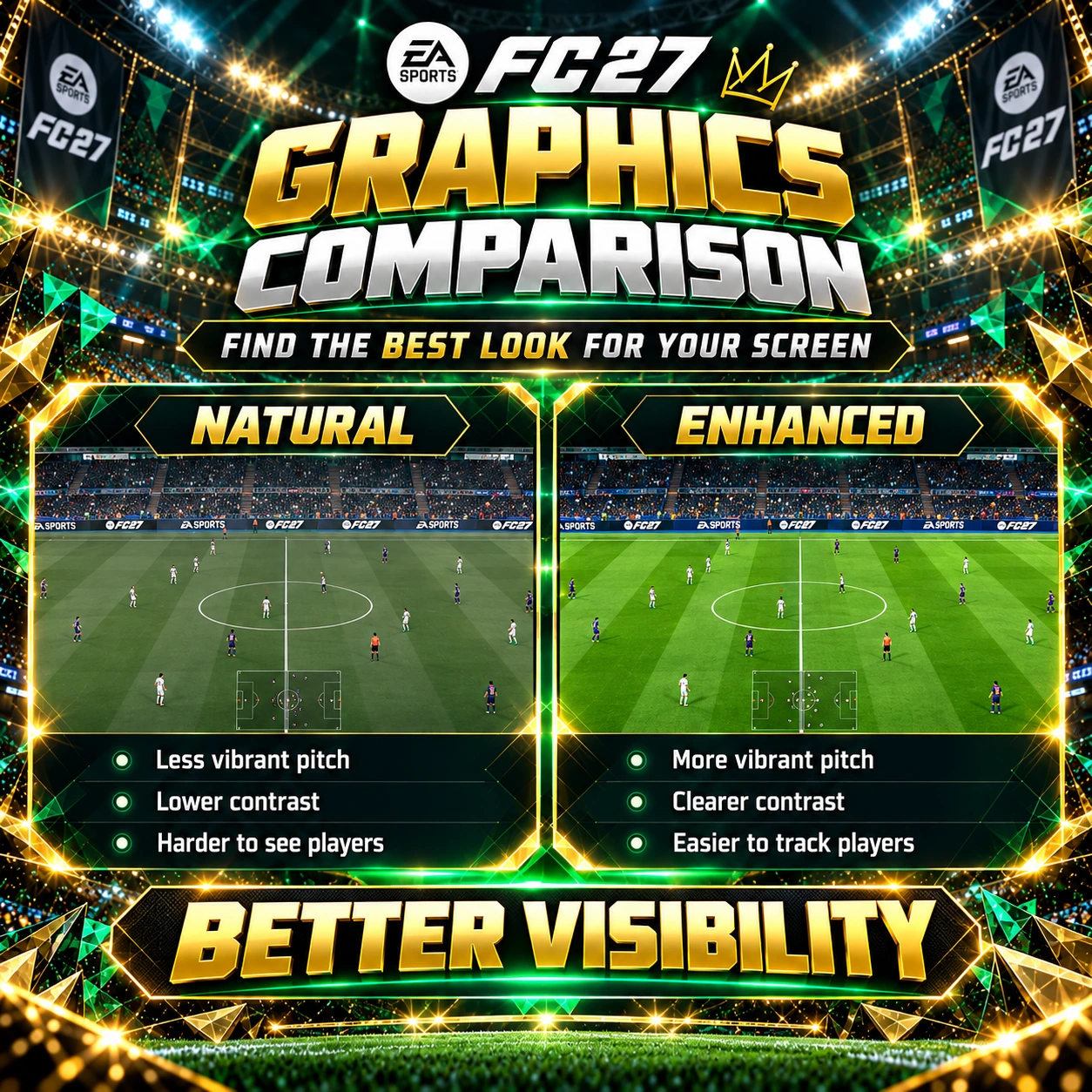
The third reference image also recommends experimenting with High Contrast Mode.
This feature is designed to improve the visibility of important gameplay elements.
Depending on the available customisation options, you can adjust the appearance of the pitch, players and other visual elements.
The reference suggests using minimal High Contrast Intensity while increasing Field Saturation to maximum.
This may create a visually striking result on some displays.
However, the appearance will vary depending on the screen.
Should You Max Out Field Saturation?
Not necessarily.
Increasing saturation can make the grass appear more vibrant.
However, very intense colours may become distracting or reduce the visibility of certain kits.
We recommend gradually increasing saturation while checking how the pitch looks during actual gameplay.
If it becomes harder to follow the ball or distinguish players, reduce the value.
Is High Contrast Mode Worth Using?
It can be useful when standard colours make gameplay difficult to read.
However, it is not necessary for every player.
Some players prefer a more natural presentation.
Others benefit from greater separation between the pitch, ball and footballers.
There is no single configuration that works perfectly across every display.
Our Recommendation: Use High Contrast Mode when it genuinely improves clarity rather than enabling it simply because it appears in a popular graphics guide.
How to Make FC 27 Graphics Look Better
If your goal is a cleaner competitive image, focus on three important aspects.
1. Ball Visibility
The ball should remain clearly visible against different areas of the pitch.
If your graphics settings make it difficult to track, reduce unnecessary colour effects or contrast.
2. Player Visibility
You should be able to distinguish your footballers from the opposition, especially during crowded defensive situations.
Avoid settings that make dark kits blend into the pitch or background.
3. Consistent Brightness
Stadium lighting and weather conditions can change how the game looks.
Try to use brightness and contrast settings that remain comfortable across different environments.
The goal is a consistent visual experience, not simply an impressive screenshot.
Best PS5 Settings – Turn Trigger Effect Off
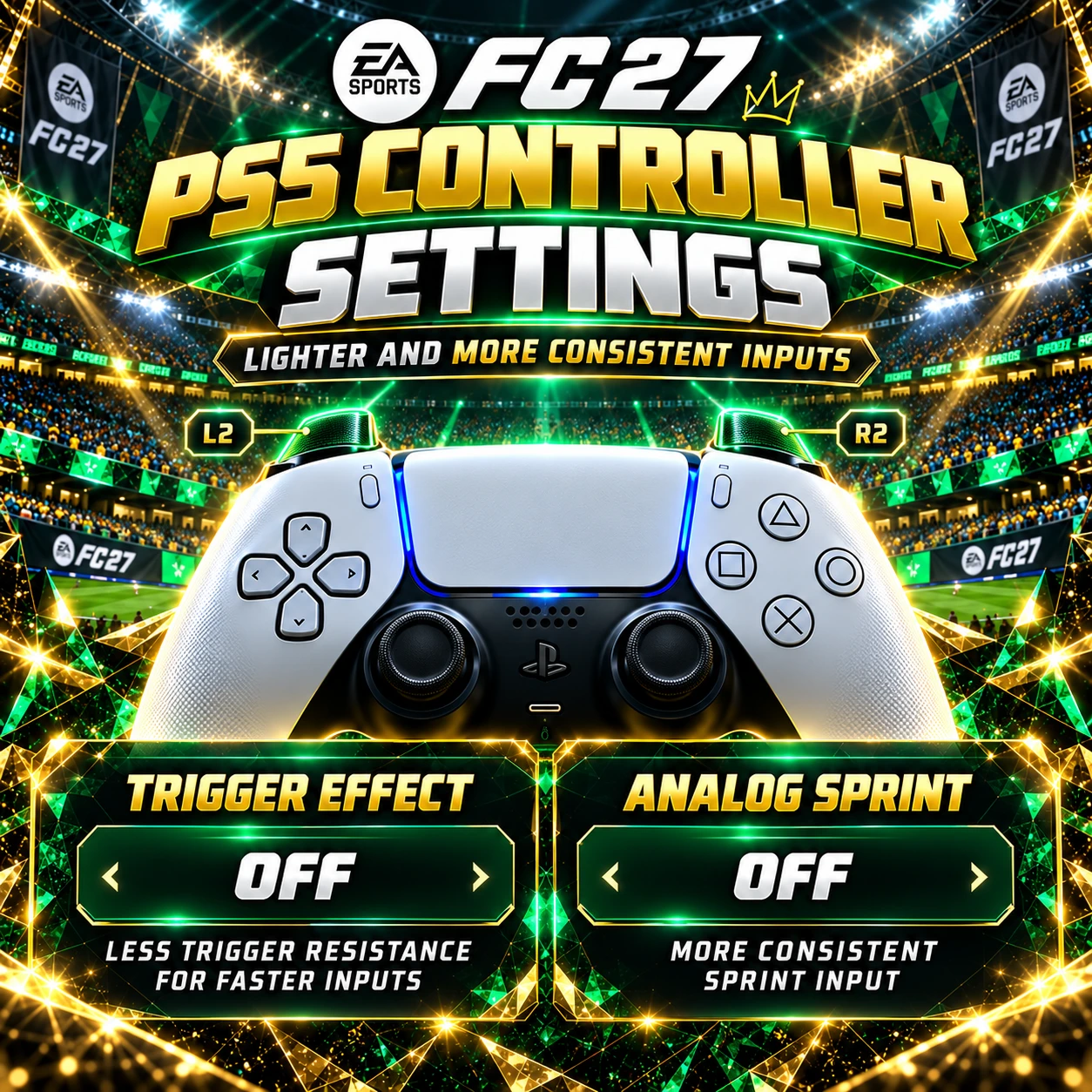
For PlayStation 5 players, there is one additional recommendation.
Trigger Effect Intensity: Off
The DualSense controller supports adaptive trigger resistance.
In games that use the feature, the triggers can provide additional physical feedback.
This can increase immersion, but some competitive players prefer a lighter and more consistent feel.
How to Disable Trigger Effect on PS5
Open:
Settings → Accessories → Controller (General) → Trigger Effect Intensity → Off
This disables the additional adaptive trigger resistance in supported games.
It does not guarantee lower input latency or faster gameplay.
The benefit is primarily about trigger comfort and consistency.
If you enjoy adaptive trigger feedback, you can leave it enabled.
However, for competitive FC 27, we recommend trying Off and deciding which option feels better.
Best FC 27 Settings for Xbox Players
Most of the recommended settings also apply to Xbox.
The general principles remain the same.
You want consistent shooting, reliable passing, controlled defending and accurate player switching.
Our main Xbox recommendations are Precision Shooting, Advanced Defending, Classic right-stick switching, Player Relative reference and Analog Sprint Off.
The biggest difference between our PlayStation and Xbox recommendations is the PS5-specific DualSense Trigger Effect setting.
Otherwise, both platforms can use essentially the same competitive configuration.
Best FC 27 Settings for Beginners vs Competitive Players
Not every player needs the same level of manual control.
A more demanding configuration can offer additional flexibility, but it also requires practice.
Here is how we recommend adjusting the most important settings depending on experience.
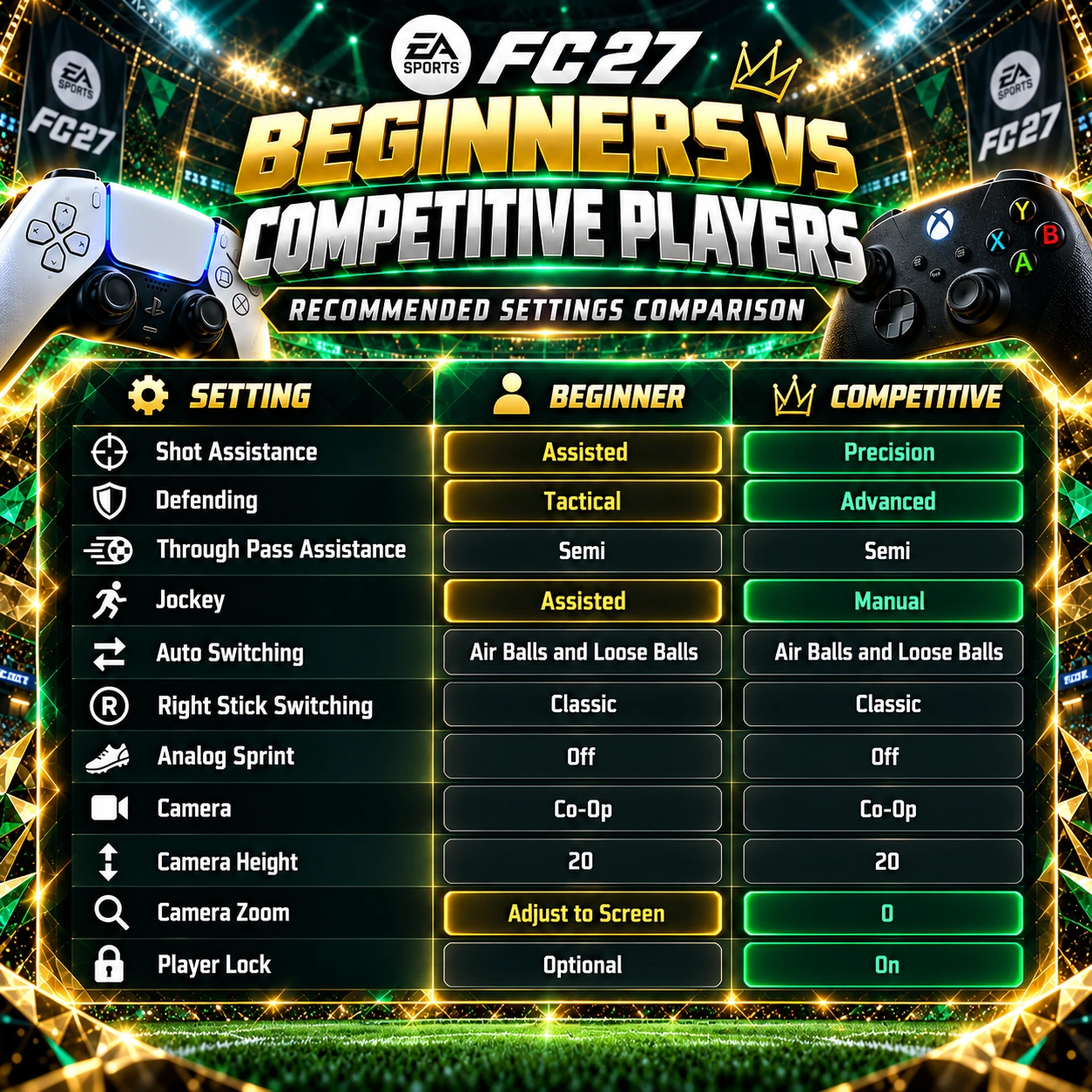
The biggest mistake is assuming that the most difficult settings are automatically the best.
They are only useful if you can perform consistently with them.
For beginners, there is nothing wrong with using additional assistance while developing better gameplay habits.
How to Test Your New FC 27 Settings
We recommend changing your configuration gradually.
Start with the camera.
Try Co-Op, Height 20 and Zoom 0 for several matches.
Pay attention to whether you can recognise attacking runs and defensive gaps more easily.
Next, adjust your player switching.
Practise selecting defenders with the right stick before your opponent makes the decisive pass.
Then compare Precision and Assisted Shooting.
Do not judge the result based on one missed chance.
Evaluate which setting gives you more consistent finishing over several matches.
After that, experiment with Advanced Defending and Manual Jockey.
Finally, adjust your graphics.
Change only one visual setting at a time and compare the result during real gameplay.
This method makes it easier to identify which changes genuinely improve your experience.
Common FC 27 Settings Mistakes
One of the biggest mistakes is copying another player's settings without understanding what they do.
A professional player may prefer demanding manual controls because they have spent years developing the necessary muscle memory.
That does not mean the same settings are immediately suitable for everyone.
Another common mistake is changing multiple settings after every defeat.
This prevents you from developing consistent habits.
Players also sometimes focus too heavily on controller options while ignoring positioning and decision-making.
Even the best camera cannot compensate for consistently poor defensive choices.
The same applies to graphics.
Maximum brightness, contrast or saturation will not automatically improve your gameplay.
Consistency matters more than constantly searching for a perfect configuration.
Final Verdict – Best FC 27 Competitive Settings
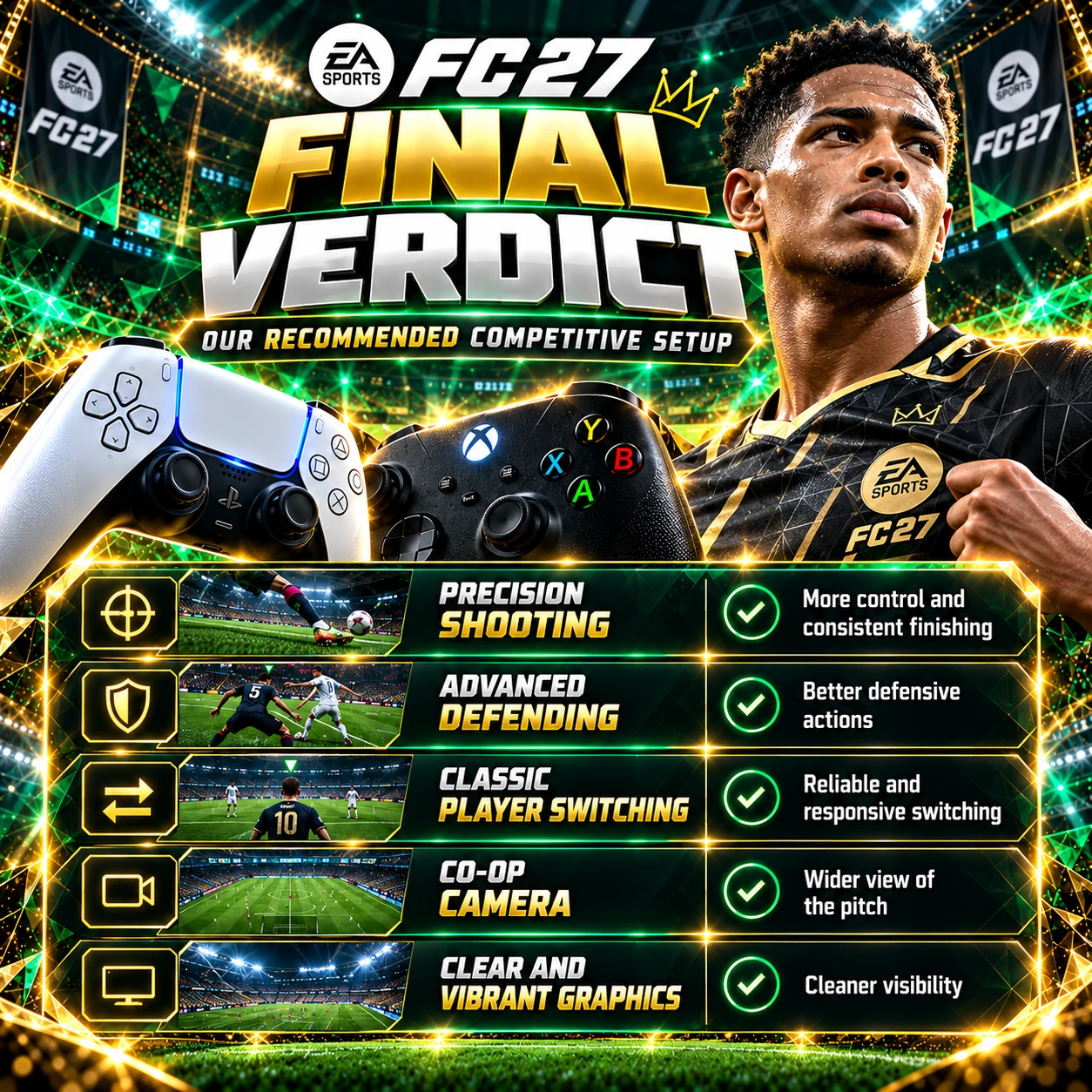
Our preferred FC 27 setup combines Precision Shooting, Advanced Defending, reliable right-stick switching and a wide Co-Op camera.
These settings provide a good foundation for players who want more control over their gameplay.
We particularly recommend Precision Shooting for players comfortable with manual aiming, Advanced Defending for more deliberate defensive challenges and Classic right-stick switching for improved player selection.
Analog Sprint Off and Player Lock On are also worth trying.
For camera settings, Co-Op with Height 20 and Zoom 0 remains our preferred starting point.
For graphics, we recommend beginning with balanced brightness and contrast, then adjusting them based on your display.
High Contrast Mode and Field Saturation can be useful, but extreme values are not automatically better.
PS5 players should also consider disabling Trigger Effect if they prefer lighter triggers.
The most important lesson is simple:
The best FC 27 settings are the ones that help you perform consistently.
Experiment, practise and keep the configuration that suits your playstyle.
Need FC 27 Coins to Upgrade Your Ultimate Team?

EA FC 27 is here, and the new Ultimate Team cycle has officially started.
The first days of the Web App and early access are always important: players are completing starter SBCs, farming Objectives, testing cheap meta cards and trying to build their first competitive squad as fast as possible.
If you want to strengthen your team early, coins can make a big difference. They help you buy key starter players, complete important SBCs, invest in useful cards and react faster to the market.
If you want to upgrade your squad and get a stronger start in Ultimate Team, you can check the latest FC 27 Coins prices on FUTBUY and build your club faster from day one.
FC 27 Best Settings FAQ
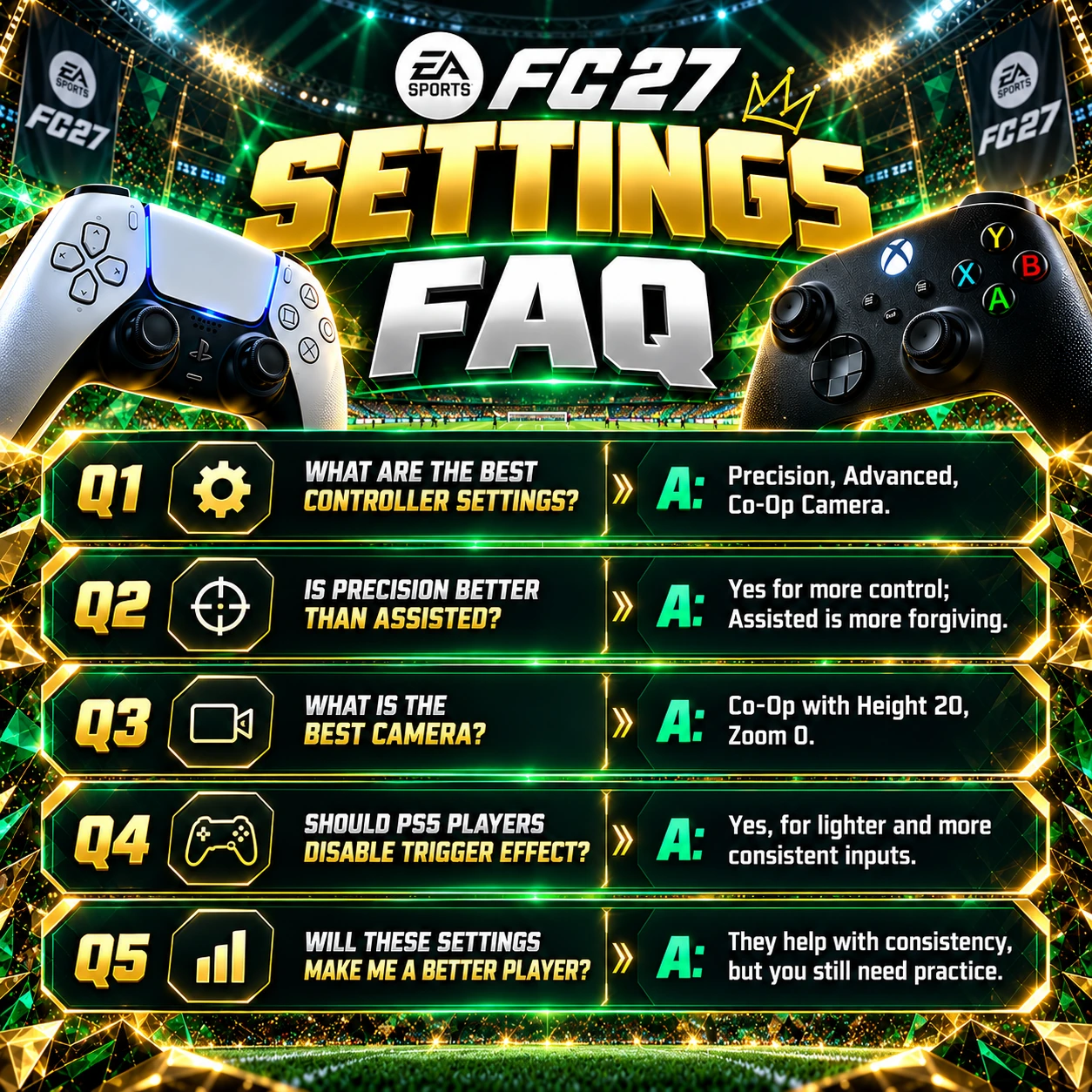
What are the best controller settings for FC 27?
Precision Shooting, Advanced Defending, Classic right-stick switching, Player Relative reference and Analog Sprint Off are our preferred competitive starting settings.
Is Precision Shooting better than Assisted?
Precision offers greater directional control, while Assisted is more forgiving. Choose the option that gives you more consistent finishing.
Should I use Advanced or Tactical Defending?
Advanced is our preference for experienced players who want additional control. Tactical is easier for beginners.
What is the best player switching setting?
Air Balls and Loose Balls auto switching, Classic right-stick switching and Player Relative reference are a strong starting combination.
What is the best camera for FC 27?
Co-Op with Height 20 and Zoom 0 is our preferred competitive setup because it provides a wide view of the pitch.
Should UT Competitive Camera be on or off?
We recommend Off when using our Co-Op setup. Players who prefer the dedicated competitive camera can experiment with On.
Should Analog Sprint be on or off?
We recommend Off for consistent sprint input, although players who prefer progressive trigger-based control can use On.
What are the best graphics settings for FC 27?
Start with balanced brightness and contrast. Adjust High Contrast Mode and Field Saturation based on your monitor or television.
Should PS5 players disable Trigger Effect?
It is worth testing. Turning it off removes adaptive trigger resistance in supported games and may feel more comfortable during competitive matches.
Will these settings improve my gameplay?
They can improve control consistency and visibility, but positioning, decision-making and regular practice remain essential.